
If you spot any mistakes or areas for improvement in my blog, feel free to reach out to me via email or on any platform. I welcome constructive feedback and am always eager to enhance the quality of my content.
Disclaimer: All information shared on this blog is strictly for educational and research purposes. Use tools and techniques only on systems you own or have explicit permission to test. The author is not responsible for any misuse of the information.
What are Browser Extensions? #
Browser extensions are like an additional helper for users when using a browser for daily purposes. Extensions are available for all categories of user like if a developer who needs a web request modifier extension, if a security analyst need a extension to configure a proxy for web application testing or even just want all the websites in dark mode, extensions are available for all these use cases. Extensions can modify any webpage they have permission to do so, and it makes the extensions a new risk as nowadays everything is going to the browser.
what are extensions from Chrome For Developers: Chrome extensions enhance the browsing experience by customizing the user interface, observing browser events, and modifying the web.
what are extensions from MDN: Extensions, or add-ons, can modify and enhance the capability of a browser. Extensions for Firefox are built using the WebExtensions API cross-browser technology.
Browser Extension in Different Browsers #
All popular browser has the capability for installing browser extensions. Some browsers also have a browser extension store where developers can upload their extensions, and those extensions can be used by the rest of the world.
Different browsers can store browser extensions at different locations in the endpoint/system. Therefore, for an investigation, analyst should be aware of what is the location of the browser extensions directory.
| Browser | Extension Directory | ||||||
|---|---|---|---|---|---|---|---|
| Chrome |
|
||||||
| Microsoft Edge |
|
||||||
| Brave Browser |
|
||||||
| Firefox |
|
Browser Extension Anatomy #
This blog will not cover how to develop a browser extension or how to write JavaScript code for browser extensions. To read more about the process of creating a browser extension, read the official documentation of Chrome for developers and Mozilla Developer Network
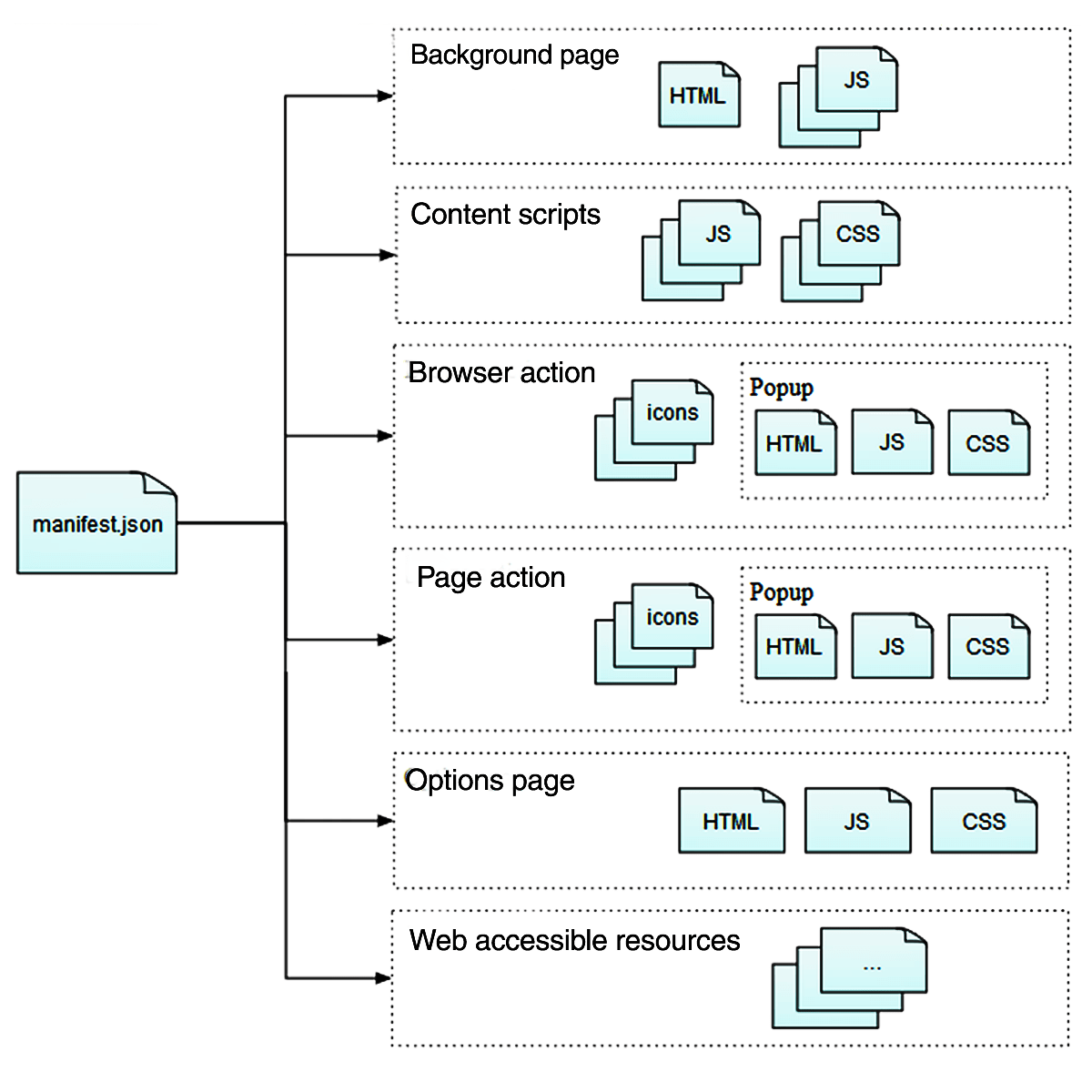
In this section, let’s understand what different files are present in the browser extension directory:
Manifest.json #
This JSON file contains details about extension like extension version, manifest version, icons, description, author of extension, permissions, actions, etc.
# Example Manifest File from https://developer.mozilla.org/en-US/docs/Mozilla/Add-ons/WebExtensions/manifest.json
# Few Manifest keys are removed which are not discussed in this blog.
{

  "background": {
    "scripts": ["jquery.js", "my-background.js"]
  },

  "browser_action": {
    "default_icon": {
      "19": "button/geo-19.png",
      "38": "button/geo-38.png"
    },
    "default_title": "Whereami?",
    "default_popup": "popup/geo.html"
  },


  "content_scripts": [
    {
      "exclude_matches": ["*://developer.mozilla.org/*"],
      "matches": ["*://*.mozilla.org/*"],
      "js": ["borderify.js"]
    }
  ],

  "default_locale": "en",

  "description": "…",

  "icons": {
    "48": "icon.png",
    "96": "[email protected]"
  },

  "manifest_version": 2,

  "name": "…",

  "page_action": {
    "default_icon": {
      "19": "button/geo-19.png",
      "38": "button/geo-38.png"
    },
    "default_title": "Whereami?",
    "default_popup": "popup/geo.html"
  },

  "permissions": ["webNavigation"],

  "version": "0.1",
}
background #
# Mozilla Manifest Example
"background": {
    "scripts": ["jquery.js", "my-background.js"]
  }

# Chrome Manifest Example https://developer.chrome.com/docs/extensions/reference/manifest/background
{
  ...
   "background": {
      "service_worker": "service-worker.js",
      "type": "module"
    },
  ...
}
The background key in manifest.json file is used to specify scripts that can handle browser events like closing a tab, new page, etc. content_scripts can’t access Webextension API, but background scripts can help. Therefore, scripts added to content_scripts key can communicate with background scripts to perform tasks.
Read More About Events in service workers For Chrome Browser
content_script #
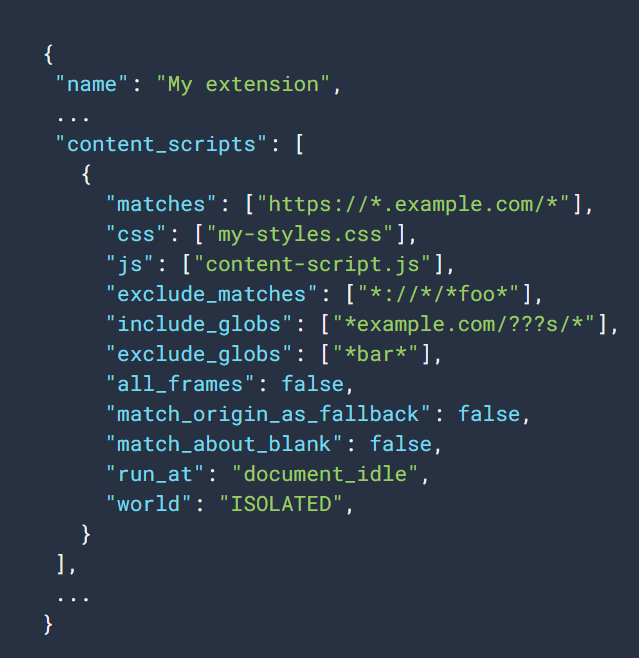
content_script key have js files, and these files will be injected into webpages, which are added to the manifest.json file content_script key matches list. These scripts can modify the webpage DOM.
"content_scripts": [
    {
      "exclude_matches": ["*://developer.mozilla.org/*"],
      "matches": ["*://*.mozilla.org/*"],
      "js": ["borderify.js"]
    }
  ],
Content Scripts key have option to add matches sections so that JS scripts or CSS code will only be injected into specific domains or URLs.
permissions #
An extension can request permission like history, tabs, webRequest, cookies, etc., by allowing permissions, extension can access or modify webpage/cookies/history/tabs, etc…
Permission list From : Mozilla Developer Network and Chrome For Developers
host_permissions #
# https://developer.chrome.com/docs/extensions/develop/concepts/declare-permissions#host-permissions
{
  "name": "Permissions Extension",
  ...
  "permissions": [
    "activeTab",
    "contextMenus",
    "storage"
  ],
  "optional_permissions": [
    "topSites",
  ],
  "host_permissions": [
    "https://www.developer.chrome.com/*"
  ],
  "optional_host_permissions":[
    "https://*/*",
    "http://*/*"
  ],
  ...
  "manifest_version": 3
}
With host_permission key in manifest.json extension can restrict its permissions to a particular host. In the above example, activeTab, contextMenus, and storage permissions are requested for url https://www.developer.chrome.com/*. If host_permission is set to <all_urls>, it means permissions are for all URLs.
action #
# https://developer.mozilla.org/en-US/docs/Mozilla/Add-ons/WebExtensions/manifest.json/browser_action
"browser_action": {
  "default_icon": {
    "16": "button/geo-16.png",
    "32": "button/geo-32.png"
  },
  "default_title": "Whereami?",
  "default_popup": "popup/geo.html",
  "theme_icons": [{
    "light": "icons/geo-16-light.png",
    "dark": "icons/geo-16.png",
    "size": 16
  }, {
    "light": "icons/geo-32-light.png",
    "dark": "icons/geo-32.png",
    "size": 32
  }]
}

# https://developer.chrome.com/docs/extensions/reference/api/action
{
  "name": "Action Extension",
  ...
  "action": {
    "default_icon": {              // optional
      "16": "images/icon16.png",   // optional
      "24": "images/icon24.png",   // optional
      "32": "images/icon32.png"    // optional
    },
    "default_title": "Click Me",   // optional, shown in tooltip
    "default_popup": "popup.html"  // optional
  },
  ...
}
action in Chrome extension or browser_action in Firefox extension are used to add additional details to the extension, like icons, popup, title, etc.
Browser Extension Submission & Review Process #
Extension store owners like Chrome Web Store Support ( Google ) and Mozilla Team have their predefined policies and processes that must be followed by extension developers when they submit their extension to publish on the extension store.
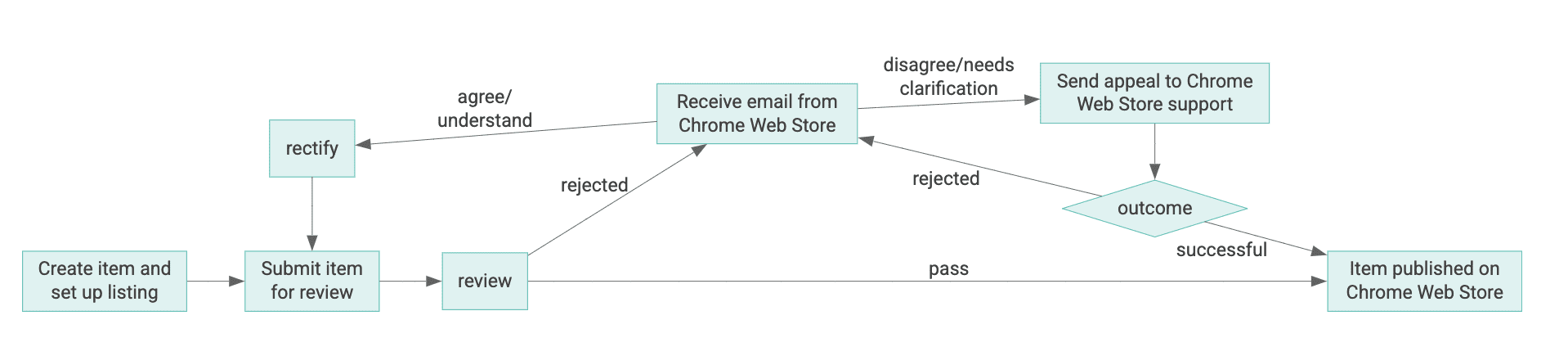
Image Source : Chrome For Developers
Check the Chrome Web Store review process document to understand the different stages extensions go through before final approval. There are also periodic reviews on Chrome Extensions according to Review Process document, and Chrome Web Store Support can also takedown or remove extensions from the webstore if policies are not followed properly by developers.
Firefox also have their Addon Policies and Addon blocking process.
Let’s now understand if there are any policies that protect end users after extension submission on the extension store
Chrome Browser #
| Activity Done By Chrome Webstore Support | End User Informed |
|---|---|
| Submission Rejection | No information shared with end user |
| Warning | No information shared with end user |
| Takedown | No immediate information shared with end user, but if the developer doesn’t respond to Chrome Web Store support, then the extension will be disabled in Chrome browser, but the user can re-enable it |
| Malware and extreme violations | Extension will be disabled on chrome browser of the end user, and the end user can’t re-enable the extension |
Check Chrome for developers Violation Enforcement documentation for more details of each activity by Chrome Web Store support.
Firefox Browser #
| Activity Done By Firefox Team | End User Informed |
|---|---|
| Restricting | Disables the Addon on Users firefox browser, but the user can re-enable it |
| Blocking | Addon disabled from the user firefox browser, users can’t re-enable it |
Check Firefox Why does Mozilla disable some add-ons from running in Firefox? documentation to understand when Firefox disabled extension and how users can check if an extension is disabled from firefox browser.
Firefox also provides addons blocking process details.
Browser Policies #
Browser Policies are a set of rules or configurations applied to the browser that restrict users from performing tasks like which extensions they can install, enable or disable the new tab page, bookmarks added by the IT administrator, and allow or deny screenshots, etc.
Firefox & Chrome both provide policy details and templates that can be used by IT teams.
Chrome enterprise documentation for Understand Chrome policy management.
Default Chrome policy precedence is: Platform policies > Machine cloud policies > OS-user policies > Cloud-user policies (Chrome profile)
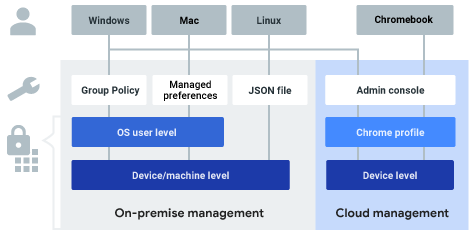
Image Source : Chrome Enterprise Documentation
Browser Extensions Risk #
Are browser extensions still a risk in 2026 #
Let’s understand the risk of browser extensions using an example. A new hypothetical browser extension is published on an extension store, and the name of the extension is SecureTheBrowserFromMalware, and this SecureTheBrowserFromMalware extension checks all URLs or IPs accessed and checks if any of them are malicious by checking in the extension database. This extension seems very helpful as it protect user from accessing malicious domains and IPs.
But to do it’s task, SecureTheBrowserFromMalware extension need permissions like webRequest, topSites [ Check Chrome Developer Permissions Document ] and users normally allow for all permissions required by extension without verifying does requested permission are required for extension to work or not and after few months or years developers of SecureTheBrowserFromMalware thought people now trust extension and then added new permissions cookies, sessions & tabs to extension in new version. Users update their extensions to the new version of SecureTheBrowserFromMalware and now extension can read all cookies and can also exfiltrate data.
From the above example, analysts can understand that browser extensions can change their behavior whenever they want, and the user will get an alert or the extension will not work, but again, since users trust extension therefore, they will allow the extension. There are also some permission that don’t raise any alert, check Chrome For Developers - Permission Warnings, No article found that confirms that if code changes also raise alert to user and the good or bad news is that chrome by default update browser extensions at startup or every few hour, Check The Chrome Extension update lifecycle document for more details on chrome extension update policy.
As of 2024, there were 111,933 extensions on the Chrome Web Store. Check Debugbear - Chrome Extension Statistics: Data From 2024 for more details. In the debugbear report, it is shown that there are 30000+ extensions that have installation less than 10, and there are 1700+ extensions that have installation in the range of 100K - 1M. There are 3 Adblocker extensions in the top 10 most popular Chrome extensions, and this is also an indicator that people are trying to find an extension that can bypass ads on websites they access, and attackers can target the same category of extensions due to their high demand.
The risk is not only to the individual users or developers, but it is also a risk to Fortune 100 to startups. Organizations have multiple security tools to monitor endpoint activity, browser activity, network activities, and cloud environment, but organizations have no policies for monitoring the browser extensions users are using and no process of approval for installing new browser extensions.
The conclusion is that browser extensions are always a risk to organizations and individual users, but these are never considered a high security risk till there are some major incidents like the CyberHaven Supply Chain Attack of 2024 and the Trust Wallet browser extension, and many more, which impacted thousands of users.
There is a research paper published by Members of Department of CSE, IIT Jammu, India A Study on Malicious Browser Extensions in 2025. This shows multiple examples of how different attacks can be done using browser extensions.
Attack Surface Area for Browser Extensions #
Extension Developers #
In new era of technology, supply chain attacks are not rare, and there are multiple ways that can lead to supply chain attack like developers api keys got leaked, attacker breached an organisation and escalted priviliege to CI/CD tools, attackers send phishing emails to developers to steal credentails etc… and all these can lead to exploit a product that have thousands of consumers.
With the rise of browser extensions for everything and yes for everything, think of password managers, adblockers, proxy configurations, dark mode, color picker, spell check, etc., and therefore extension developers are now also targeted by attackers.
Organisation which are creating extensions for it’s consumers have to take extra precautions similar to executables as software and organisations have to configure security tools like email security tool for detecting phishing at early stage, better alerting system when extensions are published, user awarness traning, monitoring for abnormal extension release patterns example extension released during non-office hours or locations which are not normally used by organisation developers, extension released other than proper CI/CD Process etc…
Check Cyberhaven Final Chrome extension security incident Report for actions extension developers can take to reduce the attack surface.
Extension Consumers #
What is the best way to identify the legit extension? Some of the ways are extension should be downloaded by multiple users, extensions have a good reputation on the extension store, verified by the extension store, developers have a good reputation on the extension store, and permissions required by extensions. These checks can avoid attacks that are not sophisticated, and if an attacker doesn’t have patience and starts attacking extension consumers very quickly. But nation state attackers, APT groups can wait for months or years for the right time to attack extension consumers, and the months or years they take are to build trust and reputation on the extension store. The second way to attack the extension consumer is a supply chain attack, which will be discussed later in this blog.
An extension developer breach can lead to a breach of the system of multiple organizations, individual developers/users. Organizations can have multiple security tools like EDR, NDR, DLP, WAF, etc., but nothing can detect malicious extensions, attacker exploit extension developer credentials by releasing new version of legit browser extension, browser automatically updates extension to newer version and now all users systems of organization are breached using extension and no alerts are raised, no suspicious activity detected by security tools.
Therefore, it is not like a browser extension developer will be following all security best practices, so extension consumers have nothing to worry about, there are multiple ways extension consumers can be attacked. Therefore, as a consumer best way of security is to not install unwanted extensions if not required and at least install extensions from a legit Extension Store and confirm the developer/organization that created the browser extension.
The Palantir Team highlighted new risks in their blog investigation key takeaways, which can be missed by security teams.
-
Users using a personal account on an organisation device, and when users are allowed to sync, they will add the extensions to the organisation device. This can be a risk if the user is already compromised by a malicious extension, and because of sync now organisation is also compromised.
-
Extension is compromised, and the extension store gets notified about a malicious extension and the extension is removed from the extension store, but don’t assume that the browser will always remove the extension.
To add more details to the 2 point of the Palantir blog, Extension Store remove extension from the browser, but it can take time, as discussed in the Browser Extension Submission & Review Process section of this blog, and sometimes users also have the option to re-enable the extension.
How Browser Extensions are Exploited #
Supply Chain Attacks #
In 2024, there was an attack on CyberHaven Browser Extension, and in Dec 2025, Trust Wallet also confirms that the Trust Wallet extension was also breached, and the common end result in both incidents is a Supply Chain Attack using browser extensions.
In the case of Cyberhaven, the attacker used a phishing technique, and the attacker controlled the OAuth application got permission to access chrome webstore. In the case of Trust Wallet, in November 2025 Sha1-Hulud supply chain attack leaked secrets, which provided attacker access to browser extension source code and Chrome Web Store API Keys.
This is similar to attacks when attackers send phishing emails to users to get login credentials for the admin portal, or RDP enabled systems, and now the same techniques are used to get access to GitHub Tokens, Chrome Web Store Keys & API Keys, etc.
The question that can be in mind is, why do attackers need to do sophisticated attacks to get Chrome Web Store Keys or Permissions to update an extension on Extension Store, when they can create an extension and update extensions on Extension Store on their own, as discussed in the example of SecureTheBrowserFromMalware extension above. The main reason is time, if attackers need to weaponize browser extensions, they have to first build trust with users for their extensions, as extensions with high downloads and verified is more likely to be installed by users. Building trust can take weeks, months, or sometimes years. Therefore, if an attacker targets any popular extension that has thousands of downloads, the attacker just needs to push a new version, and all the users systems are automatically breached, no time required to build trust.
Read KOI Research Report on ShadyPanda’s 7-Year Malware Campaign
Used as part of post exploitation #
The supply chain attack method can be used by attackers when they want to target a large number of users at the same time, and attackers are motivated by financially, infostealer, or any other reason.
There is also another method that browser extensions can be exploited, and it is not about targeting thousands of users, but as part of an attacker post exploitation toolkit. MITRE T1176.001 is for using browser extensions for persistence.
Before going to the investigation part, let’s understand how attackers are exploiting the browser extension for persistence. Detection and investigation methods will be discussed in the Investigating Browser Extension Incidents section.
Using –load-extension #
Before Chrome 137+ branded builds, there was a flag --load-extension that could be used to specify the path to the extension directory, and when the browser process is created extension will be loaded in the browser. After Chrome 137+ branded builds flag is removed, check Google Groups Thread
But this doesn’t mean there is no risk now, if the user uses an older version of the Chrome browser for testing, or doesn’t update the browser, then it means they still have risk for --load-extension.
Keep in mind, chrome branded build will no longer support --load-extension but there are lot more browser that uses chromium source code like brave, opera etc., which possibly still allow user to load extension using –load-extension flag, Brave 1.85.118 (Official Build) (64-bit) Chromium: 143.0.7499.169 still allows users to use load extension flag.
Silently Install Chrome Extension #
The --load-extension flag is removed from Chrome 137+ branded builds, it doesn’t eliminate the risk of loading browser extensions. Security Researchers already found different method to install browser extensions in the system, which also don’t require user approval and can be used as part of post-exploitation.
Let’s understand how this attack works:
- Attacker got access to the system and has sufficient permissions to update Browser files.
- A malicious browser extension downloaded on the system, and a script/tool downloaded on the system that has browser extension details.
- Secure Preferences file updated with extension details and extension dropped in browser extension directory
- When the browser process is restarted, the extension is already loaded in the browser without raising any alert from the browser to the user.
For Understanding this attack, read the below blogs:
- Silently Install Chrome Extension For Persistence - Nicholas Murray aka Syntax-err0r
- Silent Chrome Extension Installation Revisited - Nicholas Murray aka Syntax-err0r
- Silently Install Chrome Extensions — MacOS Version - Gordon Long, aka AsaurusRex
- Silently Install MacOS Chrome Extensions — Part 2 - Gordon Long, aka AsaurusRex
There was a discussion about a similar way of installing a browser extension using Preferences files on Google Groups.
Investigating Browser Extension Incidents #
Investigating the browser extensions incidents is not an easy task because there are no direct logs like process creation, ImageLoad, or DNSEvent, which can be correlated with other logs to find the root cause. If analysts are not aware, they can skip the analysis of browser extensions on systems. Therefore, understanding how browser extension works and what possible forensic evidence can be available for investigation is important.
Using System logs #
The first question that any analyst can ask is whether there is any record of network traffic activity or file system activity happening from a browser extension, so the answer is both yes and no. Activities will be recorded but those will be under browser binary like if extension is installed in chrome then all network traffic will go through chrome binary and this is problem, during incident if network logs shows that chrome binary or process is connecting to a IP/domain that is malicious and checking history, top sites files will show no evidence of accessing those websites, it is because user never accessed those domains/IP ( User maybe used private browsing in that case also history files of browser will not be updated or user cleared the entries for those domains/IPs ), it was possibly the extension which is connecting to malicious domain/IP. If an analyst is not aware of a browser extension threat, they will never find the source of the network connection.
It means no direct logs are available ( if there are any logs that can help to differentiate between browser activity and browser extension activity share that resource with me also ). But at least there are logs for Chrome or any other browser process, and activity on the extension and browser directory on the user system.
First, let’s only discuss Windows system logs and Sysmon logs. Windows event ID 4688 can provide details about a new process, but this is not very useful. Users can spawn browser processes multiple times, filtering on process commandlines is there any additional flag provided, like --load-extension can help to find suspicious activity, sysmon eventID 1 can also provide the same information. Other than commandline check parent process, it is less likely that normal users launching browsers from cmd, powershell or bash, etc., exceptions can be made for servers where extension testings are done, or a headless browser is used for QA testing. There can be an exception for particular system location for the extension developers system but always remember exclusions create detection gaps.
For attacks like Silent Chrome checking commandline and the parent process will fail because no --load-extension flag is used. Investigate if there are logs of Chrome browser process termination and launching in a few seconds, as to load the extension browser process should be restarted, or the attacker has to wait till user restart browser process. Silently Install Chrome Extension For Persistence blog also suggested that to check if files like secure preferences, preferences are updated by a process other than Chrome or the browser process.
Investigation of File Creation EventCode 11 of sysmon logs can help to find if any changes are made to the extension directory, like creation of a new directory, and these file creation activity is done by a process other than chrome like cmd, powershell, bash, etc. It is not required to add an extension to the browser extension directory for a silent Chrome attack, as the source code have variable for extension location, check source code of windows_silent_chrome.py.
Investigate Sysmon EventCode 22 for DNS Logs and EventCode 3 for network connection logs. These do not necessarily provide a direct indication of the malicious browser extension, but at least provide an indicator that there is some malicious activity happening through the browser.
File Creation events can be very helpful as they can provide evidence when a browser extension is installed, as all browsers should download the extension file from the Extension store to install on the system therefore, File Creation events will definitely occur. File Creation and File Modification event can also be helpful in case of detecting Silent Chrome attack, as a silent chrome attack involves copying/downloading of tools and custom extensions on the victim machine therefore File creation/modification logs can provide a lot of evidence to find the root cause of the attack and when and how the victim system got compromised.
| Extension Store | Extension |
|---|---|
| Chrome Web Store | .crx |
| Firefox Extension Store | .xpi |
Linux systems if have EDR installed, then there will be a lot of telemetry which can be used similarly to Windows logs to find the root cause of suspicious activity, otherwise sysmon is also available for Linux. SysmonForLinux will not have the same level of logging available for activities as available in Sysmon for Windows. But Sysmon for Linux can provide details about process creation, file creation, network connections, process access, etc.
Check SysmonForLinux Example Config From MSTIC-sysmon
Using $MFT and $USNJRNL #
There can be a situation where no EDR agent is installed on the system, and no Sysmon is configured, in such cases, it becomes very difficult to find evidence of an extension downloaded either from Extension Store or by email, cmd.exe/powershell.exe etc…
In such cases, if the machine is windows then the analyst will be lucky as windows have forensic artifacts like $MFT record and $USNJRNL, which provide information about files created and modified on the system.
Check Microsoft Documentation For $MFT and $USNJRNL
Check the References section of the blog to find resources that can help to understand how to use $MFT & $usnjrnl during Windows system investigation.
Investigating Browser Extension Files #
During investigation, it is not sufficient to only check logs for network activity, file activity, etc. To understand the scope of the attack, investigating extension files is also important.
Investigation of extension files can be very easy, and sometimes it can be as complex as analyzing an exe/elf binary. Malware authors can use JS obfuscation tools, and then it becomes difficult as either analyst has to deobfuscate JS code or find if deobfuscater is available, or the best solution is go for dynamic analysis of JS code.
Chromium based browser like brave, chrome directly create a directory in the browser user profile directory, but Firefox has a different method. Firefox creates a file with the file extension .xpi in the extension directory, which is actually a zip file. So, when investigating Firefox extension change the .xpi extension to .zip, extract the zip file, and the extracted directory will have the same files that are discussed in the Browser Extension Anatomy section of this blog. If downloading any Chrome Web Store extension in packed format, it will have a .crx extension, and crx is also a zip file, therefore rename the extension to .zip and unzip the file.
Extension source code is either obfuscated or without obfuscation, there are a few steps common for both:
- Investigate Manifest.json file
- Permission required by Extension
- Check content_scripts to find if the extension targets any particular category of domains like crypto, email websites, etc…
- Check background scripts
- Host permissions can provide details about if extension is using permissions for a specific domain
- Find if extensionID directory contains multiple version directories of extension, it can provide information that user normally uses extension or not and when which version directory are last updated and try to find the creation date of version directory in windows
$MFTcan help and analyst can download latest version of extension from Extension store and try to check if hash value of content script, background script and manifest.json files matches or not. If hashes don’t match then possible extension is modified and require proper forensic investigation.
- If no obfuscation is used by the extension developer, then it will be easy to understand the code, as it will be just JavaScript code.
- If obfuscation is used, then try using free js deobfuscate tools like deobfuscate.io and de4js
- After deobfuscation, analyst can start analysing the JS code. This blog will not cover how to analyse JS malware, which can be for another blog. Added multiple resources in the references section if interested in how to analyse JS Code.
Detections For Browser Extensions #
-
Using a SIEM solution that can correlate the IOCs from multiple Intel sources and network logs for malicious IPs/Domains communicated by Chrome or any other browser process.
-
In Silently Install Chrome Extension For Persistence blog, a great detection idea is shared, to check if files like secure preferences, preferences are updated by a process other than Chrome or the browser process.
-
Modern EDR provides details about extensions installed in the device, these can contain details like extensionID, permissions, Version, Method of installation, etc. These logs can be used to check for known malicious browser extensions and can also detect extensions that should not be downloaded or installed. These logs can also identify suspicious methods of installation, like sideloading, etc.
-
Check process creation logs from EDR or Sysmon for process commandline and check for suspicious flags like
--load-extension.
How to protect against Browser Extension attacks as a consumer #
- The best way to protect users is to only allow users to install approved browser extensions. This can be used by an organization that uses Google Enterprise. Check Set Chrome app and extension policies (Windows) documentation.
- Create detection for known malicious extensions and known attack methods.
- Protection against Supply Chain Attacks is not easy because a trusted developer or organization can be breached, and in such cases, there will be no indicator of compromise or indicator of attack.
- Allow user to load or install the extension only from legit sources like browsers extension store ( Extension Store also can’t be trusted completely)
- Don’t allow user to sync their personal account into organisation-owned devices. Check the Google Document for Manage who can sync browser settings ( This suggestion is from Palantir Blog)
- The IT Team should restrict User to login into the organisation’s devices using personal email accounts. Check Google Document for Block access to consumer accounts. IT Teams can check Chrome Enterprise policy list to find more policies that can be implemented to reduce risk.
References #
-
Detecting and Analyzing Timestomping Using KAPE and Timeline Explorer - $MFT
-
Malware Analysis - JS to PowerShell to XWorm with Binary Refinery - MalwareAnalysisForHedgehogs
-
Detecting Fake Browser Updates Attacks with Google Security Operations - wesleymok
-
JSFireTruck: Exploring Malicious JavaScript Using JSF*ck as an Obfuscation Technique
-
Malicious JavaScript Injection Campaign Infects 51k Websites
-
I Spy with My Little Eye: Analysis and Detection of Spying Browser Extensions
-
A LNK Between Browsers: Hunting Methodologies and Extension Abusing Actors - Mandiant
-
Rilide: A New Malicious Browser Extension for Stealing Cryptocurrencies
-
Managing and Automating Browser Extensions at Scale - Palantir
-
Targeted supply chain attack against Chrome browser extensions - Sekoia
-
Introduction to Chrome Browser Extension Security Testing - Cobalt
-
Splunk Add to Chrome? Blogs : Part 1: An Analysis of Chrome Browser Extension Security | Part 2: How We Did Our Research | Part 3: Findings and Recommendations | Part 4: Threat Hunting in 3-Dimensions